AI clipboard actions.
Instant. Private.

Copy text, code, or an error message. Hit ⌘⇧V. Pick an action. The on-device model transforms it in seconds — no cloud, no API keys, no data leaving your Mac.

MIT Open Source macOS 26+ (Tahoe) Apple Silicon 100% On-Device
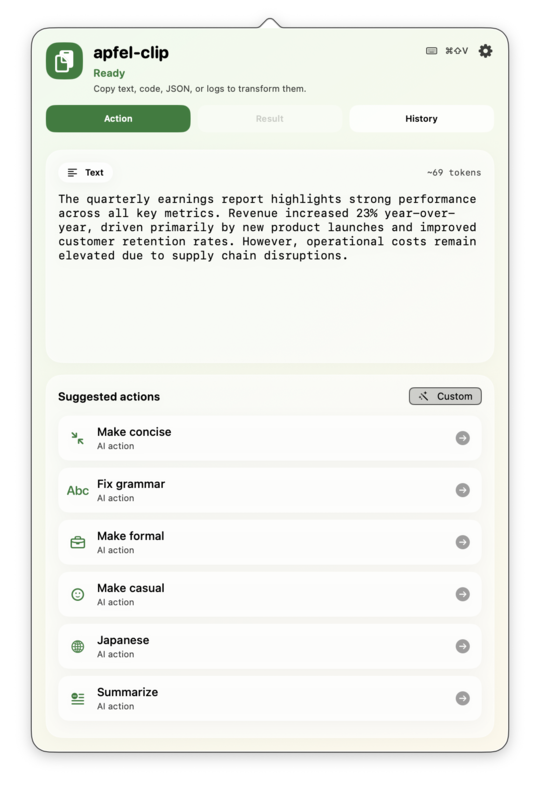
apfel-clip action list showing AI actions for clipboard text

Three steps from copy to done

No setup beyond installation. Just copy whatever you're working with and hit the hotkey.

1

Copy anything

Grab text, code, a stack trace, a shell command, or JSON from anywhere on your Mac. The app detects the content type automatically.

2

Hit ⌘⇧V

The menu bar popover opens showing tailored actions for what's in your clipboard — different suggestions for prose, code, errors, and JSON.

3

Pick, paste, done

Choose an action. Apple's on-device model runs it in seconds. The result lands in your clipboard ready to paste — or use the result panel to review and edit first.

Built for your whole workflow

Smart content detection means the right actions appear for whatever you copied — prose, code, errors, or JSON.

✍️ Text actions

Fix grammar, make it more formal or casual, translate, summarise, convert to bullet points — tailored to prose.

Text action suggestions in apfel-clip

💻 Code actions

Explain, find bugs, add comments, simplify — switched on automatically when you copy code.
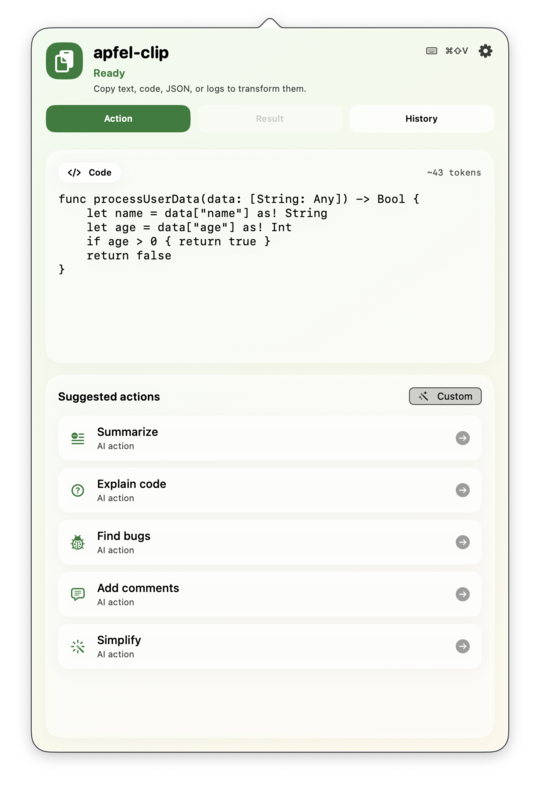
Code action suggestions in apfel-clip

Clean result view

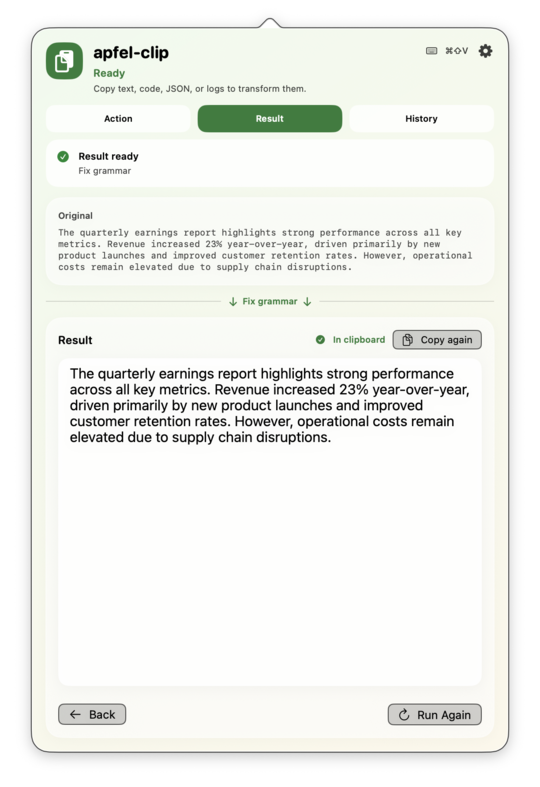
Side-by-side original and result. Edit in place, copy to clipboard, or run the action again in one tap.

Result panel showing transformation output

🕐 Persistent history

Every successful transformation is saved locally so you can re-copy or revisit past results without rerunning.
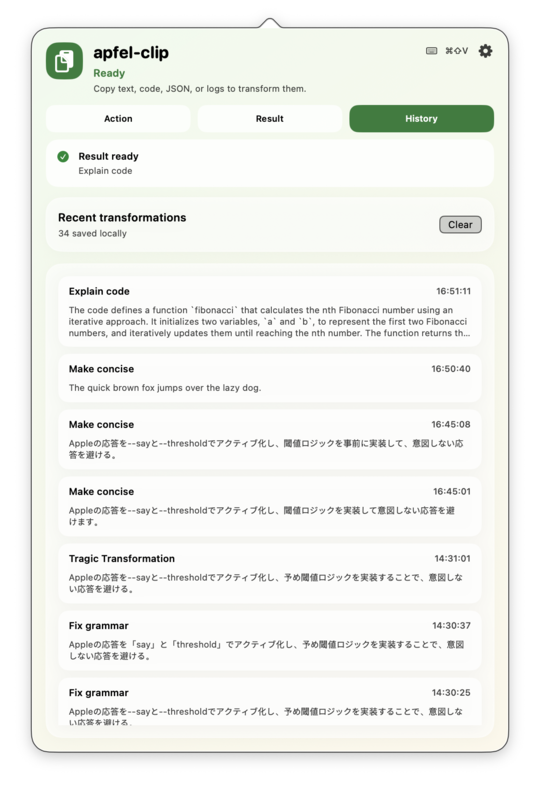
History panel showing past transformations

Everything you need, nothing you don't

Designed around the fastest possible copy → transform → paste flow.

🔒

Fully on-device

Powered by Apple Intelligence via apfel. No API keys, no network calls, no data sent anywhere.

🧠

Content-aware actions

Detects text, code, JSON, errors, and shell commands automatically. Shows only the relevant actions.

⌨️

Global hotkey

⌘⇧V opens the popover from anywhere, no matter what app is focused. Works from the menu bar too.

💾

Save custom actions

Turn any custom prompt into a named, icon-tagged action. It shows up in the action list automatically.

Favourites & reorder

Star your most-used actions, hide ones you don't use, drag to reorder. Your list, your way.

📋

Auto-copy results

Enable auto-copy and transformed text lands in your clipboard the moment the model finishes — zero extra clicks.

Requirements

apfel-clip runs entirely on your Mac using Apple's on-device model. You need all three of these.

🍎

macOS 26 (Tahoe)

Required for Apple Intelligence. Check Apple menu → System Settings → General → Software Update.

⚙️

Apple Silicon (M1+)

Apple Intelligence only runs on Apple Silicon. Check Apple menu → About This Mac — it should say M1, M2, M3, or M4.

🧠

Apple Intelligence enabled

Enable it in System Settings → Apple Intelligence & Siri → Apple Intelligence. Requires an English device language.

Also needed: apfel — the on-device AI engine. Packaged builds (install script, Homebrew, zip download) embed it inside the app bundle automatically. Only needed separately if you build from source: brew install Arthur-Ficial/tap/apfel

Four ways to install

All methods install apfel-clip.app to /Applications with apfel already embedded — no extra setup.

Recommended

One-liner — paste in Terminal

curl -fsSL https://raw.githubusercontent.com/Arthur-Ficial/apfel-clip/main/scripts/install.sh | zsh

Downloads the latest release, installs apfel-clip.app to /Applications, and links apfel-clip into ~/.local/bin. Requires zsh (default on macOS).

🍺 Homebrew Cask

# Add the tap once, then install
brew tap Arthur-Ficial/tap
brew install --cask apfel-clip

The --cask flag is required. Updates via brew upgrade --cask apfel-clip.
Don't have Homebrew? Install it first at brew.sh.

📦 Direct download (zip)

Download, unzip, drag to /Applications.

↓ apfel-clip-macos-arm64.zip

SHA-256 checksums in each release. Apple Silicon only.

🔨 Build from source

git clone https://github.com/Arthur-Ficial/apfel-clip.git
cd apfel-clip
make install

Requires Xcode command-line tools and apfel on PATH.

After installing

  1. Open apfel-clip from /Applications
  2. See the clipboard icon appear in your menu bar
  3. Copy any text, code, or error message
  4. Press ⌘⇧V — the action panel opens
  5. Pick an action → result appears instantly

⚠️ Gatekeeper warning

On first launch macOS may block the app because it isn't notarised. To open it:
Right-click (or Control-click) apfel-clip.app → Open → Open
You only need to do this once. The warning won't appear again.

Uninstall: Delete /Applications/apfel-clip.app.
Settings are stored in ~/Library/Preferences and history in ~/Library/Application Support/apfel-clip. Delete those folders to wipe all data.

Free and open source

apfel-clip is MIT-licensed. Use it, fork it, ship it in your own projects. Contributions welcome — bug reports, pull requests, and new action ideas.